Onyx, LibreChat, and Open Web UI are the three open-source platforms most teams compare when they want a self-hosted ChatGPT. Each solves a different slice of the private-AI problem. They overlap enough to feel like alternatives, but in practice they work as complements, and picking the wrong one for your use case is the most common reason private-AI projects stall after the pilot.
This is a side-by-side comparison of where each one wins, where it falls short, and which combination matches which kind of deployment. If you already know you want a managed deployment of all three wired together in your tenant, jump to our self-hosted AI deployment service →. Otherwise, read on.
What each one is, at a glance
Before the deep dive, the one-line summary of each tool:
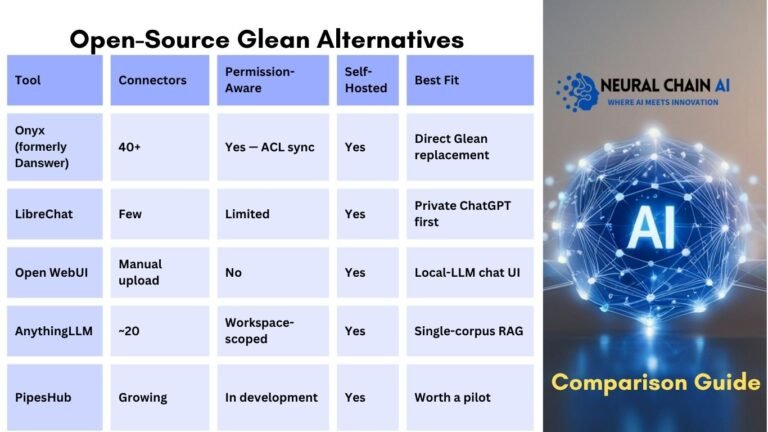
- Onyx (formerly Danswer): Enterprise search platform with 40+ workplace-app connectors, permission-aware retrieval, and chat-with-citations. The closest one-to-one match for Glean in the open-source world.
- LibreChat: Multi-model self-hosted ChatGPT alternative. Polished chat UI, 8+ LLM providers (OpenAI, Anthropic, Gemini, Bedrock, plus self-hosted via vLLM/Ollama), agents, code interpreter, MCP support.
- Open Web UI: Polished chat interface for Ollama-served local LLMs. Strong individual-developer adoption, smaller-team workstation deployments, and quick local-RAG setups.
All three are MIT-licensed and self-hosted by default. The interesting question is which one fits which job, and how they stack together in a production deployment.
1. Onyx (formerly Danswer): enterprise search and chat with citations
Onyx is built around the enterprise-search use case: index documents and conversations from across your workplace apps, respect each source’s native ACLs, and let employees query the whole corpus through a chat UI that returns grounded answers with inline citations. Same shape as Glean, with the entire data path under your control.
What Onyx ships:
- 40+ connectors out of the box: Slack, Google Drive, Confluence, Notion, Jira, GitHub, GitLab, Salesforce, SharePoint, OneDrive, Box, Linear, Asana, Zendesk, Gmail, Outlook, Microsoft Teams, and more.
- Permission-aware retrieval. Connectors sync source-app ACLs alongside content. Users only see results from documents they have access to in the source app.
- Chat with citations. Answers come back with inline links to source paragraphs in the original document, so responses stay grounded and checkable.
- Kubernetes Helm chart or Docker Compose deployment. Runs in your VPC, on-prem, or fully air-gapped.
- MIT open-source license; an Onyx Cloud edition adds managed hosting, SSO, and multi-tenancy.
- Production scale: Netflix, Ramp, and 1,000+ teams per Onyx’s published case studies.
Best for: companies where enterprise search across many workplace apps is the headline use case, such as replacing or augmenting Glean, internal wikis that nobody updates, or knowledge fragmentation across SaaS tools.
Where Onyx falls short: the chat UI is functional but less polished than LibreChat for general-purpose ChatGPT-style work. If chat rather than search is the primary use case, you’d run LibreChat for chat and feed Onyx retrieval through it.
2. LibreChat: multi-model chat with BYO-LLM, agents, and MCP
LibreChat is the closest open-source equivalent to ChatGPT Enterprise: a polished multi-model chat UI with admin controls, SSO, agents, code interpreter, and MCP support. Where ChatGPT Enterprise is locked to OpenAI’s models, LibreChat treats the LLM as a pluggable backend you choose per assistant or per route.
What LibreChat ships:
- Multi-model routing across OpenAI, Anthropic, Gemini, AWS Bedrock, Azure OpenAI, Mistral, plus any self-hosted model via vLLM or Ollama. Switch models per-team, per-assistant, or per-question.
- Agents, code interpreter, and web search. Tool calling, structured outputs, and an agent framework comparable to ChatGPT Apps.
- MCP (Model Context Protocol) support. Plug in external tools and data sources through the open MCP standard.
- Image generation via DALL·E and other providers; vision input on supported models.
- Custom assistants per team or use case, each with its own system prompt, tools, document scope, and model choice.
- Enterprise auth: SAML SSO, OIDC, OAuth, and LDAP. Role-based access controls and full audit logging.
- MIT open-source license; battle-tested in production at Shopify, Daimler, Boston University, ClickHouse, and Stripe.
Best for: private-ChatGPT-for-business deployments where multi-model routing, agents, and per-team customization are the headline requirements. Also the right pick if you’re replacing ChatGPT Enterprise specifically.
Where LibreChat falls short: the connector ecosystem for enterprise document search is narrower than Onyx’s. RAG over uploaded files works fine, but for “search across 40+ workplace apps with permission-aware retrieval,” you’d run Onyx alongside and feed its results into LibreChat.
3. Open Web UI: local-LLM chat for individuals and small teams
Open Web UI is the most popular chat interface for Ollama-served local LLMs. It started as a frontend for Ollama and has grown into a feature-rich chat UI with RAG, plugins, vision, and web search, but its center of gravity remains the developer-and-small-team market running models on local GPUs.
What Open Web UI ships:
- Tight Ollama integration. Model pulling, switching, and management built into the UI.
- RAG over uploaded documents. Drag-and-drop a PDF or folder, then chat over it. Workspace-scoped rather than connector-driven.
- Plugin ecosystem for custom tools, prompts, and integrations.
- Vision and web search on supported models.
- Smaller deployment footprint: runs comfortably on a single VM or even a developer workstation.
- MIT open-source license; massive individual-developer adoption, common in small ML teams and AI research groups.
Best for: developers and ML engineers running Ollama locally; small teams that want a private ChatGPT without standing up a full enterprise deployment; quick proofs-of-concept that may later graduate to LibreChat + Onyx.
Where Open Web UI falls short: SSO/RBAC and audit logging are limited compared to LibreChat’s enterprise auth story. There’s no native connector ecosystem against SaaS apps, so document ingestion is upload-driven. For production deployments past ~50 users with compliance posture, LibreChat is the better fit; for pure local-LLM workstation use, Open Web UI is simpler.
Side-by-side comparison
| Capability | Onyx | LibreChat | Open Web UI |
|---|---|---|---|
| Primary use case | Enterprise search + chat | Multi-model chat | Local-LLM chat |
| Connector ecosystem | 40+ native | Limited (RAG over upload) | Manual upload |
| BYO-LLM routing | Yes (via gateway) | Yes (8+ providers) | Yes (Ollama-focused) |
| Permission-aware retrieval | Yes (ACL sync) | Limited | No |
| Agents / tool calling | Limited | Yes (full agents) | Plugin-based |
| Code interpreter | No | Yes | No |
| MCP support | Limited | Yes | Limited |
| SSO / SAML | Enterprise edition | Yes (native) | Limited |
| Audit / RBAC | Enterprise edition | Yes (native) | Limited |
| Deployment | Helm / Compose | Helm / Compose | Docker / standalone |
| License | MIT | MIT | MIT |
| Production reference | Netflix, Ramp, 1,000+ teams | Shopify, Daimler, Stripe | Individual devs + small teams |
The complement-not-alternative angle
The most common mistake teams make is treating these three as a “pick one” decision. In practice they are complementary layers of the same private-AI stack. In production deployments past ~100 users, the right architecture usually combines all three:
- Onyx becomes the enterprise-search and retrieval engine: connectors sync from Slack, Drive, Confluence, GitHub, and your industry-specific systems, and permission-aware retrieval keeps ACLs intact.
- LibreChat becomes the front-door chat UI: multi-model routing across cloud and self-hosted, agents, code interpreter, MCP, and per-team assistants. Onyx feeds retrieval results into LibreChat through MCP or API.
- Open Web UI handles workstation-class deployments for the technical population: developers, ML engineers, and data scientists running Ollama locally for code, prototyping, and exploration.
The result is enterprise search depth (Onyx) plus polished multi-model chat (LibreChat) plus local-developer tooling (Open Web UI) under one architecture, in your tenant, under your audit logs. That’s the stack our self-hosted AI deployment engagement ships by default.
Deployment realities
All three are MIT open-source. You can deploy them yourself. The deploy is straightforward; the operating reality after week one is the hard part:
- All three projects ship rapidly: Onyx and LibreChat every few weeks, Open Web UI roughly weekly. Versions break things, so staying current requires a real release cadence.
- Connector evolution: vendors change auth flows, ACL schemas, and rate limits without warning, so connectors need ongoing maintenance.
- SSO/RBAC integration with your existing IdP (Okta, Azure AD, JumpCloud, Google Workspace) is fiddly across three different platforms.
- LLM-serving capacity has to be sized to traffic and re-sized as adoption grows.
- Audit logs across three systems need to be aggregated for compliance review.
Most teams that try to operate all of this in-house end up stalled two months in with a half-deployed stack. The deployment is the easy part; operating it through model drift, connector changes, and quarterly version bumps is where the real work lives.
Which one fits your team?
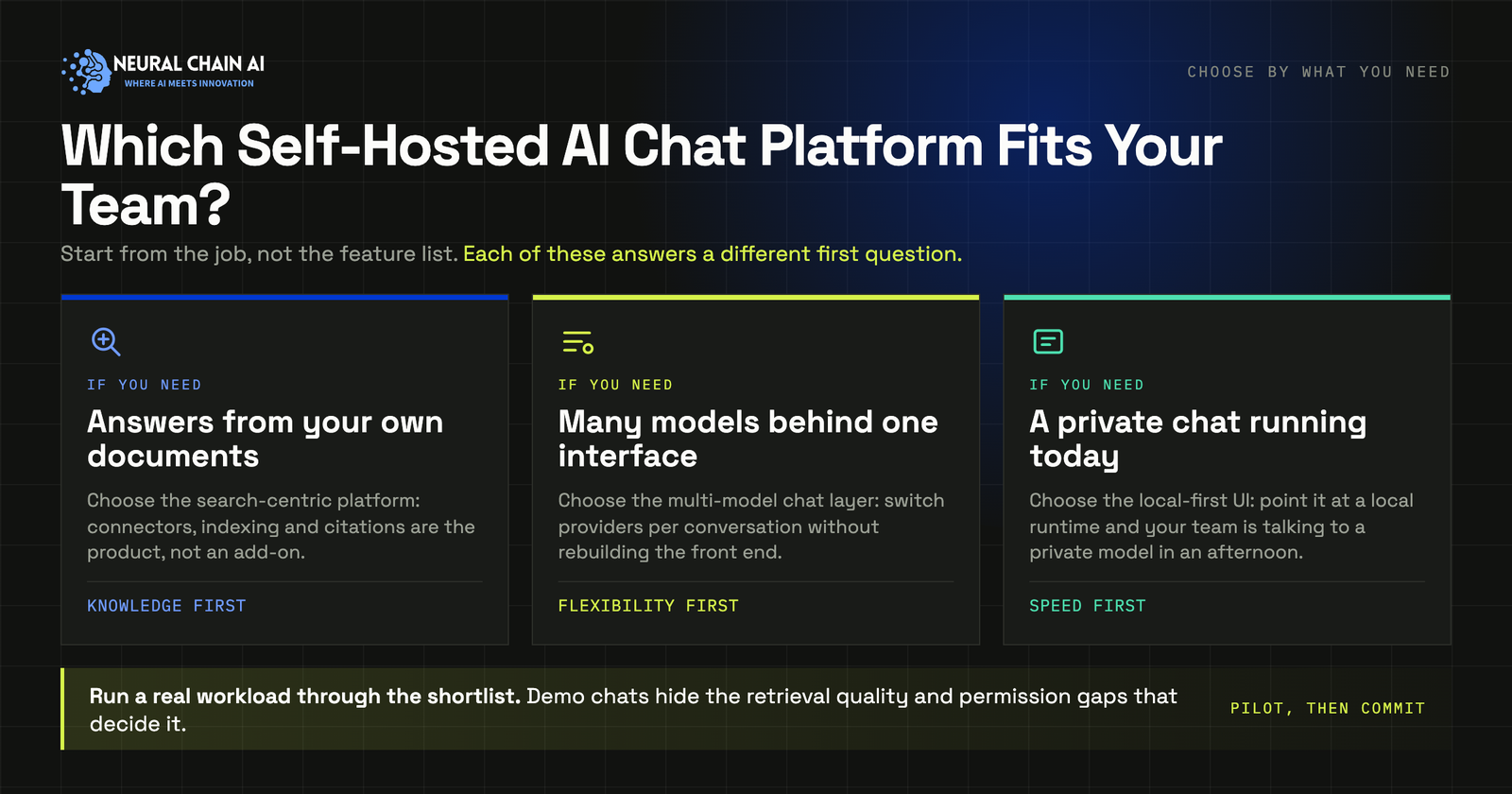
Quick decision tree based on the headline use case:
- “I want enterprise search across all our SaaS apps”: Onyx is the right starting point. Closest one-to-one match for Glean.
- “I want a private ChatGPT for business with BYO-LLM and agents”: LibreChat is the right starting point. Replaces ChatGPT Enterprise, with broader model support.
- “I want quick local-LLM chat for my engineering or research team”: Open Web UI is the right starting point. Pairs cleanly with Ollama.
- “I want all of the above wired together as one production deployment”: the full stack, LibreChat + Onyx + vLLM, deployed in your tenant. That’s the self-hosted AI deployment engagement.
At small scale (single team, low double-digit users) any one of the three works alone. Past 100+ users with multiple teams and any compliance posture, the stack-them-together approach is where most production deployments land.
Frequently asked questions
A list of common questions we get about Onyx, LibreChat, and Open Web UI.
Onyx vs LibreChat vs Open Web UI: What next?
Onyx handles search, LibreChat handles chat, and Open Web UI handles local-LLM work. Together they cover most of the surface area teams want when they say “private AI”: enterprise search across workplace apps, polished multi-model chat with BYO-LLM routing, and individual-developer local tooling, all under MIT licenses and all self-hosted.
The right pick depends entirely on which job you’re hiring AI for first. For most teams at scale the honest answer ends up being “all three, wired together,” with Onyx feeding retrieval into LibreChat and Open Web UI handling the technical-user population. That’s the architecture our self-hosted AI deployment engagement ships by default: chat, search, and model serving as one integrated stack in your tenant, with custom connectors against your industry-specific systems and an optional managed retainer for ongoing operation.
Three questions that usually decide it
- Is the headline use case enterprise search across many SaaS apps, or polished multi-model chat with agents?
- Are you past ~100 users today, or expecting to be inside a year?
- Do you want one production stack that does all three, or a single-tool pilot first?
If the answer to (1) is “both,” or the answer to (2) is “yes,” or the answer to (3) is “one stack,” then stack-them-together is the right architecture.
Want a directional read on your situation?Book a 45-minute strategy session →
Disclaimer: This article reflects publicly available information on the Onyx, LibreChat, and Open Web UI projects as of May 2026. Capabilities, version cadence, and feature parity may shift as the projects evolve. License terms and production references should be verified directly with each project. This guide is informational and does not constitute purchase, contractual, or legal advice.