AI training workshop design for a team rolling out Claude or ChatGPT starts with the company’s own documents, accounts and rules. This post sets out a sample agenda in seven segments, the exercise each segment runs on real company material, what each role leaves with and how the workshop is prepared on your company’s workspace.
A rollout hands staff a new AI assistant and a set of rules at the same moment. The workshop is where they practice both on the work they already do, inside the workspace they will keep using. The sample agenda below can run as one AI workshop or across several sessions, and the segments keep the same order either way.
Why Teams Rolling Out Claude or ChatGPT Run a Workshop
A workshop runs after the setup work. The company has chosen Claude Team or Enterprise, or ChatGPT Business or Enterprise, connected SSO, approved its first connectors and written an AI use policy, and staff have accounts. What they need next is practice with the AI assistant on their own tasks, with the rules applied as they go. The sample agenda fits teams on Claude Team, which Anthropic describes as “for teams of 2 to 150”, as well as Claude Enterprise and ChatGPT Business or Enterprise workspaces.
Running every exercise on company material does two things. Staff see the AI assistant handle work they recognize, so they can judge the AI output. Every question about data, disclosure or approvals also comes up on a real document, where the policy answer is easy to remember.
The Sample Agenda for an AI Training Workshop
The agenda has seven segments, each built around one AI exercise on company material. Clock times are left out because the pace depends on group size, the roles in the room and how much material each team brings.
| Segment | What the team does with the AI assistant | Company material used | What people leave with |
|---|---|---|---|
| 1. Workspace and rules | Sign in through SSO, tour the workspace, walk through the data rules | The AI use policy and the plan’s data settings | A working company login and the policy in plain terms |
| 2. How the assistant answers | Ask one question with and without a company document | One approved company document | The habit of asking where an answer came from |
| 3. Prompting on real work | Rebuild a quick prompt into a full one for a task from their role | Emails, meeting notes and reports from each team | Saved prompts for daily tasks |
| 4. Checking output | Find and fix seeded errors in an AI draft | A draft built from a company document | A role checklist |
| 5. Shared Projects and custom GPTs | Build a shared workspace for one recurring team task | Templates, past examples and reference files | One tested shared Project or custom GPT |
| 6. Connected tools | Use approved connectors on a real task | Company systems reached through admin-approved connectors | The list of approved connectors and the request path |
| 7. Role breakouts and wrap-up | Run one role task from start to finish | Each role’s own documents | A signed policy acknowledgment and tasks to try next |
Segment by Segment: How the AI Workshop Runs
1. The Company AI Workspace and Its Rules
Everyone signs in through company SSO and opens the AI workspace the company bought. The facilitator walks through the AI use policy on screen: approved tools, data that stays out, when AI-assisted work is disclosed and how connector requests work. The plan’s data settings come next. Anthropic lists model training as “None by default” on Claude Team and Enterprise, and OpenAI’s business pricing page states “No training on your business data by default” for ChatGPT Business. Staff leave this segment knowing which account to use and why.
2. How Claude or ChatGPT Answers a Question
The group asks the AI assistant one business question twice, first with no context and then with an approved company document attached. Comparing the two answers shows where an answer comes from: the model’s general training, the material in the conversation, or company data reached through a connector. The same AI model can also word an answer differently each time, which is why the workshop pairs saved prompts with a checking routine. The habit staff take away is asking where each answer came from before they use it.
3. Prompting on the Team’s Own Work
Each person brings a real task, such as a client email, meeting notes to summarize, a report section or a procedure to draft. They write a quick prompt, then rebuild it with context, the task, the source material, the format and an example of good output, and compare how the AI output changes as each element is added. Everyone leaves with a few saved prompts for tasks they do often.
4. Checking AI Output
The facilitator hands out an AI draft built from a company document, with errors seeded in: a wrong figure, a swapped name, a sentence the source never contained. Groups find and fix them, then list the checks they used. That list becomes a role checklist covering figures, names, dates, quotes and anything going to a client. Anything the AI states about a client, a price or a contract also gets a named reviewer.
5. Shared Projects and Custom GPTs for Repeat Work
Each team picks one recurring task and builds a shared AI workspace for it, with instructions, templates and past examples. On Claude, Project sharing and collaboration come with the Team and Enterprise plans. In a ChatGPT workshop, this segment builds a shared project or a custom GPT on ChatGPT Business, where admins get GPT analytics and management. The team tests the workspace on a live example before the segment closes.
6. Connected Tools and Approvals
Where the admin has approved connectors, staff use them on a real task and see what each one can reach. On Claude Team, “only Owners and Primary Owners can add” custom connectors, and each user then connects individually. With the HubSpot connector for Claude, the connector inherits each user’s own HubSpot permissions, and write tools can be set to “Needs approval.” In a ChatGPT workshop, the segment covers the apps that connect ChatGPT Business to internal tools, as the admin has enabled them. Staff learn which connectors are approved and how to request a new one through the admin.
7. Role Breakouts and Wrap-Up
Teams split by role and run one task from start to finish on their own documents, using their saved prompts, the shared AI workspace and the checklist. The workshop closes with each person’s policy acknowledgment and a short list of tasks to try on the AI assistant afterward.
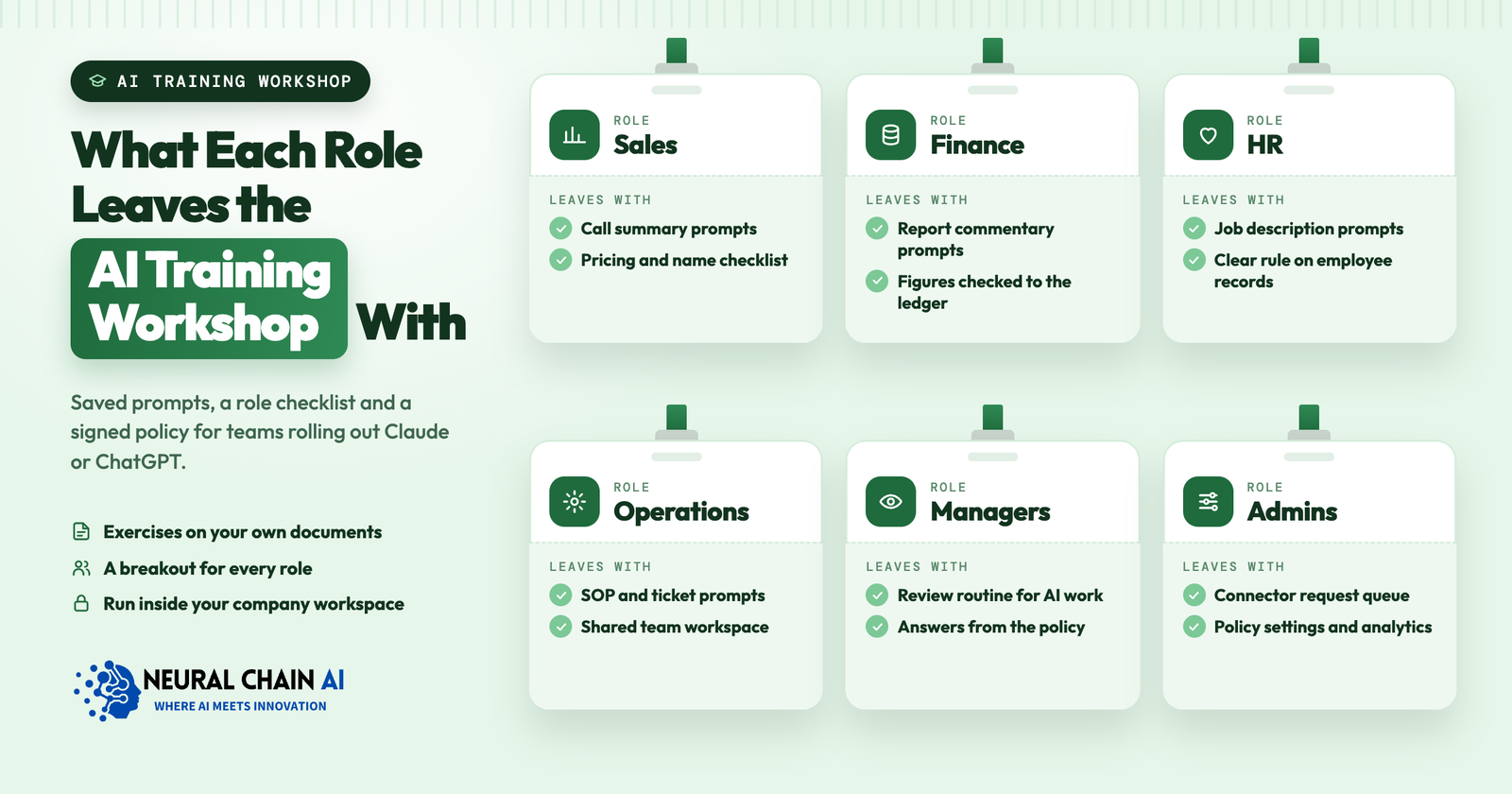
What Each Role Leaves the AI Workshop With
Every role leaves the AI training workshop with material it keeps using on the assistant.
- Sales and business development. Prompts for call summaries, follow-up emails and proposal sections, plus a checklist for pricing and client names.
- Finance. Prompts for report commentary and variance explanations, with every figure checked against the ledger.
- HR. Prompts for job descriptions and policy answers, and a clear rule on which employee records stay out of the assistant.
- Operations. SOP and ticket-summary prompts, and a shared workspace for the team’s most frequent request.
- Managers. A routine for reviewing AI-assisted work from their team and answering staff questions from the policy.
- Admins. The queue of connector requests, the settings that enforce the policy and the analytics to watch.
Who Runs and Attends the AI Workshop
A facilitator who knows the company’s AI assistant runs the sessions. Each team lead attends with their team, because they choose the exercise material and answer role questions. An admin joins the connected-tools segment to handle connector requests and explain the AI settings behind the policy. Groups stay small enough for everyone to complete each exercise on their own account.
The Same Agenda as a Copilot Workshop
Microsoft 365 companies can run the same segments as a Copilot workshop. The connected-tools segment changes the most, because Copilot reaches company data through Microsoft 365 permissions. Microsoft states that Copilot “only surfaces organizational data to which individual users have at least view permissions,” so the exercise doubles as a check on which files each person can open. The shared-workspace segment uses Copilot Notebooks, which Microsoft describes as a way to “keep all project content in one smart workspace with AI assistance to organize tasks and support collaboration.” Notebooks are included with the Microsoft 365 Copilot add-on and have limited capabilities in Copilot Chat, which is available at no additional cost for Microsoft Entra account users with an eligible Microsoft 365 subscription.
Preparing the Workshop on Your Claude or ChatGPT Workspace
Preparation decides how much a team gets from the AI workshop. Before it runs:
- Accounts and SSO are live. On Claude, an Owner verifies the domain with a DNS TXT record, connects the identity provider and turns on JIT provisioning. Once an Owner turns on Require SSO, domain users not assigned in the identity provider no longer reach their personal Claude accounts, so staff move their work into the company workspace beforehand. ChatGPT Business includes SAML SSO, domain verification and bulk member management.
- The AI use policy is written. Each team lead knows the data rules for their team.
- Material is chosen and cleared. Each team lead picks documents for the AI exercises, and anything the policy holds back is removed or replaced with a sample.
- Connectors are approved and scoped. The admin sets up the ones the exercises use.
- Starter prompts and the seeded-error AI draft are ready. Each role gets its own set.
If the workspace is still being set up, our Claude Team and Enterprise rollout and ChatGPT Business and Enterprise rollout services cover plan choice, SSO, admin settings and connectors ahead of training. Anthropic and OpenAI bill seats directly to your company.
Measuring AI Use After the Workshop
AI use after the workshop shows whether it worked. Claude Team and Enterprise include usage analytics, and ChatGPT Business includes GPT analytics and management, so admins can follow how use of the assistant and shared GPTs changes. The saved prompts, shared workspaces and policy acknowledgments are the other measures. A follow-up session built on the questions staff raise afterward keeps the training tied to real work.
Our AI training for employees runs these workshops on-site or remote, live or recorded. The schedule depends on headcount, the roles involved and how much material needs clearing.
We run AI training workshops for teams rolling out Claude or ChatGPT, on your own workspace, with exercises on your documents and a breakout for each role. See our AI training for employees service, or book an AI strategy session to plan the agenda with us.