AI for small business pays off when the whole team uses one assistant under a company account, with clear rules on what goes into it. This how-to covers choosing between ChatGPT, Claude, Microsoft Copilot and Gemini based on the tools you already use, setting the assistant up with company logins and admin settings, writing plain rules for staff, and getting your team using it on the repetitive tasks that fill their working day.
The productivity case for an AI assistant comes from controlled studies. In an experiment published in Science in 2023, MIT researchers Shakked Noy and Whitney Zhang gave writing tasks to 453 college-educated professionals, including marketers, consultants, data analysts and HR staff. Those with access to ChatGPT finished 40% faster, and independent evaluators rated their work 18% higher. A National Bureau of Economic Research working paper by Erik Brynjolfsson, Danielle Li and Lindsey Raymond found that customer support agents with an AI assistant resolved 14% more issues per hour on average, and 34% more among novice and less-skilled agents.
In a small business the same few people write the emails, quotes, posts and procedures, so time saved on each task adds up across the whole team. Most small teams start with a patchwork of personal accounts: one person on ChatGPT, another on a free Gemini login, a third trying Claude. For owners working out how to get started with AI, choosing one AI assistant for small business use gives everyone the same tool, the same shared prompts and the same company data settings, and it lets the owner see who is using it and for what.
Step 1: Choose One AI Assistant That Matches the Tools You Already Use
The best AI tools for small business sit inside the software your staff open every morning. Start from your email, calendar and file storage, then check which assistant reads them natively. All four vendors sell a business tier, and the published list prices below were read on October 29, 2026.
Your team works in Microsoft 365: Microsoft Copilot
If your files live in Outlook, Teams, Word, Excel and SharePoint, Microsoft Copilot is the natural fit. Microsoft’s pricing page says Copilot Chat is “available at no additional cost for all Microsoft Entra account users” with an eligible Microsoft 365 subscription, so many teams can try AI chat before buying anything. The Microsoft 365 Copilot Business add-on lists at $18.00 per user per month paid yearly (a first-year promotional price), or $25.20 paid monthly, on top of a Business Basic, Standard or Premium plan, Apps for Business or Teams Essentials. Microsoft’s footnote reads “Prices shown are for marketing purposes only and may not reflect the actual list price.” Copilot “only surfaces organizational data to which individual users have at least view permissions,” according to Microsoft’s privacy documentation, so tidy shared folder permissions before you switch it on.
Your team works in Google Workspace: Gemini
Google Workspace plans already include Gemini. On Google’s Workspace pricing page, Business Starter at $7 per user per month includes Gemini in Gmail, and Business Standard at $14 adds Gemini in Docs, Sheets, Drive, Meet and Chat. Google’s Workspace privacy hub states that “Workspace does not use customer data for training models without customer’s prior permission or instruction.” For a team already on Business Standard, the assistant is part of the plan you pay for, and the setup work is switching on the right features and settings.
Your team uses a mix of apps: ChatGPT Business or Claude Team
If your stack mixes a CRM, accounting software and more than one email provider, a standalone assistant with connectors works well. OpenAI’s business pricing page lists a ChatGPT Business Standard seat at $20 per user per month billed annually, or $25 monthly, with SAML SSO, an admin console, Projects and shared projects, and apps that connect to internal tools. Anthropic’s pricing page lists the Claude Team Standard seat at the same $20 annual and $25 monthly rates, for teams of 2 to 150.
Anthropic launched Claude for Small Business on May 13, 2026. Anthropic describes it as “a toggle install” inside Claude Cowork that adds “15 ready-to-run agentic workflows” and “15 skills” across finance, operations, sales, marketing, HR and customer service, with connectors for Intuit QuickBooks, PayPal, HubSpot, Canva, Docusign, Google Workspace and Microsoft 365. Its plan advice reads “Pro for one person, Team for a business with more than one.”
| Tools your team uses today | Assistant that fits | Published business price | What the AI works with |
|---|---|---|---|
| Microsoft 365 (Outlook, Teams, SharePoint) | Microsoft 365 Copilot Business | $18.00/user/month yearly (first-year offer) or $25.20 monthly; Copilot Chat at no additional cost | Mail, chats and files each user can already view |
| Google Workspace (Gmail, Drive, Docs) | Gemini in Workspace | Included in Business Starter ($7) and Business Standard ($14) | Gmail on Starter; Docs, Sheets, Drive, Meet and Chat on Standard |
| Mixed apps (CRM, file storage, internal tools) | ChatGPT Business | Standard seat $20 billed annually or $25 monthly | Apps connecting to internal tools, company knowledge, shared projects |
| Mixed apps (accounting, payments, sales tools) | Claude Team with Claude for Small Business | Standard seat $20 billed annually or $25 monthly | Connectors such as QuickBooks, PayPal, HubSpot, Google Workspace and Microsoft 365 |
Pick one and move everyone onto it. A single assistant means one set of admin settings, one training plan and one bill to track.
Step 2: Set Up the Assistant With Company Logins and Admin Settings
A business plan puts the AI assistant under company control. Staff sign in with their work email, an admin decides who has a seat, and the vendor applies its business data terms. Anthropic lists model training on Claude Team and Enterprise as “None by default.” OpenAI’s pricing page says ChatGPT Business has “No training on your business data by default.” Microsoft states that “prompts, responses, and data accessed through Microsoft Graph aren’t used to train foundation LLMs.” Personal ChatGPT Free and Plus accounts are used for model training unless the user switches it off in OpenAI’s Data Controls settings, and Claude Free, Pro and Max work on an opt-out basis, so moving staff onto the company workspace is part of the setup.
The setup runs in five steps.
- Buy seats on the business plan directly from the vendor, on monthly or annual billing.
- Verify your domain and turn on single sign-on. Claude Team and ChatGPT Business both include SSO and domain verification, so staff use the same work login they use for email.
- Assign admin roles. Give owner rights to one or two people and standard seats to everyone else.
- Connect one or two tools. Pick the system your team searches most, such as Google Drive, SharePoint or HubSpot. On Claude Team, Anthropic’s help center says “only Owners and Primary Owners can add” custom connectors, and each user then connects with their own login.
- Create shared projects for repeat work, such as a sales project holding your price list and proposal template. Claude Team includes Project sharing, and ChatGPT Business includes shared projects.
Step 3: Write Plain Rules for What Staff Put Into AI
A one-page AI use policy answers the three questions staff ask in their first session: which tool, which data, and who checks the output. Keep it short enough that people read it. A three-tier data rule covers most small businesses.
- Green: public information, marketing drafts and general questions. Fine in the company assistant.
- Amber: customer names, quotes, internal reports and supplier terms. Company workspace only, signed in through SSO.
- Red: card numbers, banking details, health information and passwords. These stay out of every AI tool.
Add three more lines. Staff use the company account for all work tasks, a person reviews anything that goes to a customer, and questions go to a named owner. NeuralChainAI writes a full AI acceptable use policy matched to the admin settings of the assistant you choose, and rolls it out with staff.
Step 4: Give Each Role a Set of Repetitive Tasks for AI
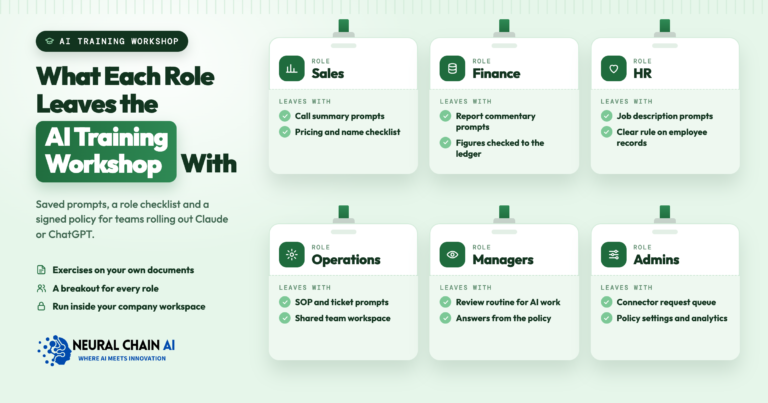
People keep using an assistant when it saves them time on work they already do. Give each role two or three repetitive tasks, write a saved prompt for each, and store the prompts in a shared project so nobody starts from a blank box. AI for repetitive tasks is where small teams see the hours come back.
- Owner and office manager: draft replies to routine emails, turn meeting notes into action lists, and summarize a long supplier email or contract before a call.
- Sales: write follow-up emails from call notes, prepare a quote cover letter from the price list, and summarize a prospect’s website before a meeting.
- Marketing: AI for small business marketing covers social posts, product descriptions, newsletter drafts and ad variations, all written against a saved brand voice guide.
- Customer service: draft answers from your FAQ and policy documents, then edit before sending.
- Operations and bookkeeping: turn rough notes into a step-by-step SOP, clean up a spreadsheet, explain a formula, or sort expenses into categories for review.
Each task keeps a person in the loop. The assistant writes the first draft, and the employee checks facts, numbers and tone before anything leaves the business. That pattern matches the Science study, where people with ChatGPT still submitted the final work and quality scores went up. AI for business productivity comes from that split, with the model drafting and reformatting and your staff deciding.
Step 5: Train Your Team by Role and Track Who Uses the Assistant
Training lands best on the team’s own documents, grouped by role. A sales session works through real follow-ups and quotes, and an operations session turns a real process into an SOP. Free vendor material helps here. Anthropic offers a free “AI Fluency for Small Business” course, co-presented with PayPal, and lists free in-person workshops. OpenAI’s small business program, launched July 21, 2026, is an enablement program with virtual product webinars, in-person small business AI academies and new guides; teams still buy a Business plan for seats.
NeuralChainAI runs AI training for employees by role, built on the tasks each person already does. After training, track three numbers each month:
- Active seats: the share of paid seats used that month. Claude Team includes usage analytics, and ChatGPT Business includes user analytics and an analytics dashboard.
- Tasks by role: which saved prompts and shared projects each team uses, gathered from the admin view and a short staff survey.
- Time saved per task: reported by staff and labelled as their own estimate.
Seats that sit idle point to a role that needs better first tasks or a follow-up session. Busy seats point to prompts worth sharing with the rest of the team.
How NeuralChainAI Helps Small Teams Choose and Roll Out One Assistant
NeuralChainAI helps small teams choose, set up and train on one assistant. We compare your current tools against ChatGPT, Claude, Microsoft Copilot and Gemini and recommend a plan. We configure SSO, admin roles and data settings, scope the first connectors to the data each role needs, write the AI use policy, and run role-based training. We then set up adoption tracking and hand over an admin runbook so your team runs the assistant from there. Seats stay on your own account with the vendor, which bills you directly. When a job should run without someone prompting it, such as sorting the shared inbox or entering invoices, our AI automation agency builds an AI agent for that job on the tools your team already uses.
Ready to choose one assistant and get your team using it? Our AI enablement services for Claude, ChatGPT, Copilot and Gemini cover plan choice, setup, staff rules and role-based training for small teams. To talk through your current tools first, book an AI strategy session.