Claude for small business is Anthropic’s program of ready-made AI workflows, skills, connectors and free training for owners who want an AI assistant working inside the tools their company already runs on. This guide explains what the program includes, which Claude plan a small team needs, and how to set it up, from the first login through connectors, shared Projects, a staff AI policy and training.
Anthropic launched Claude for Small Business on May 13, 2026. The program has no size rule. Anthropic says most owners using it run businesses under ten people, so the setup below assumes a small team where one person looks after the software alongside their main role.
The program sits on top of a standard Claude plan. Getting value from it comes down to three decisions: the plan and seats, which business apps Claude may connect to, and the rules staff follow when they use the AI. The sections below cover each one in the order the setup runs.
What Claude for Small Business Includes
The program installs inside Claude Cowork, and Anthropic describes it as “a toggle install”. Once it is switched on, the team gets “15 ready-to-run agentic workflows” and “15 skills” spread across six areas of a small company: finance, operations, sales, marketing, HR and customer service. Because they arrive ready to run, the owner’s job is matching them to the work the team repeats each month and connecting the apps they rely on.
Connectors are the part that brings the company’s own data into Claude. Anthropic’s announcement lists Intuit QuickBooks, PayPal, HubSpot, Canva, Docusign, Google Workspace and Microsoft 365. The program page on claude.com adds Xero, Shopify, Gusto, Stripe, Slack, Zapier and “25 more”. In a typical small business the bookkeeper connects QuickBooks or Xero, the sales lead connects HubSpot, and the whole team connects Google Workspace or Microsoft 365, each person through their own login.
Training is part of the program too. Anthropic offers a free course called “AI Fluency for Small Business”, co-presented with PayPal, and lists free in-person workshops. We found no program discount on Anthropic’s pages, so budget for standard plan prices.
Which Claude Plan a Small Team Needs: Pro or Team
Anthropic’s guidance for the program is short: “Pro for one person, Team for a business with more than one; both are month to month.” A sole owner using Claude for their own drafting, research and bookkeeping questions can start on Pro. Once a second person needs access, Team is the Claude for business plan that lets staff work together and gives the owner admin controls over the AI.
The Claude pricing page describes Team as “for teams of 2 to 150”. A Standard seat costs $20 per seat per month billed annually or $25 billed monthly. A Premium seat costs $100 per seat per month billed annually or $125 billed monthly. Billing runs monthly or annually on a credit card, and annual billing saves $5 a month on every Standard seat.
Team adds the controls a business needs once several people share an assistant: single sign-on (SSO) and domain verification, JIT provisioning, admin controls for remote and local connectors, usage analytics, and Project sharing. Free, Pro and Max plans do not share Projects. Data handling differs as well. The pricing page lists model training on Team as “None by default” and on Pro as “Opt-out”, so a business on Team keeps company conversations out of model training without anyone changing a setting. Anthropic’s commercial terms add that “Anthropic may not train models on Customer Content from Services.”
Enterprise sits above Team and adds SCIM, domain capture, role-based access, audit logs, custom data retention controls and the Compliance API. It is priced as a seat plus usage at API rates, with a self-serve option at US$20 per seat per month billed annually and a 20-seat minimum. Few small businesses need it at the start, and moving up is a normal step once user management or audit requirements grow.
The table shows how the setup runs on Team, what each step gives staff, and what a person still checks.
| Setup step | What the owner configures | What staff get | What a person checks |
|---|---|---|---|
| Workspace and seats | Team plan, Standard or Premium seat per person, monthly or annual billing | Their own Claude login inside the company workspace | Every invite goes to a company email address |
| Domain and sign-in | Domain verified with a DNS TXT record; SSO and JIT where an identity provider is in use | Sign-in with their work account | Every staff member is assigned in the identity provider before Require SSO goes on |
| Program install | Claude for Small Business toggled on in Cowork | 15 agentic workflows and 15 skills ready to run | Which workflows match the team’s repeat work |
| Connectors | Approved apps added by an Owner; unneeded tool calls switched off | Claude working with their apps through their own login | Each person’s app permissions match their job |
| Shared Projects | One Project per recurring job, with a named owner | A shared starting point for repeat work | Reference material stays current |
| Policy and training | A one-page AI use policy and a role-based session | Clear rules and practice on their own tasks | A manager reads AI drafts before they reach a client |
How to Set Up Claude for Small Business, From First Login to Connectors
The setup runs in five steps, each building on the one before. By the end, staff sign in with company accounts, the program is installed, approved apps are connected, and everyone knows the rules.
1. Create the Team workspace and invite staff
The owner signs up for Team, chooses monthly or annual billing, and invites each person at their company email address. Company addresses matter later, because domain verification and SSO apply to the company domain. Keep the Owner role with the person who manages the company’s software, since on Team only Owners and Primary Owners can add custom connectors.
2. Verify the domain and set up company sign-in
An Owner verifies the company domain by adding a DNS TXT record. A business that already uses an identity provider such as Okta, Microsoft Entra ID or Google can then connect it and turn on JIT provisioning, so staff get a Claude account the first time they sign in with their work login. The last switch is Require SSO. Once it is on, domain users who are not assigned in the identity provider can no longer reach their personal Claude accounts, so the owner assigns every staff member first and turns it on after that.
3. Turn on Claude for Small Business in Cowork
With logins in place, the owner turns on the program inside Claude Cowork. We review the 15 workflows and 15 skills against a list of the jobs staff repeat every month, such as month-end bookkeeping prep, quote follow-ups, job postings and customer replies, and switch on the ones that match. The rest stay available as the team grows into the AI.
4. Approve connectors and scope each one
Connectors give Claude access to the apps the business runs on, so each one gets a deliberate decision. On Team, only Owners and Primary Owners can add custom connectors, and once a connector is added to the organization each person connects to it with their own account. Owners can also switch off specific tool calls a connector offers, so the team keeps the tools it uses and drops the rest.
HubSpot shows how this works in practice. Each user connects their own HubSpot login, and the connector inherits that user’s HubSpot permissions, so a sales rep reaches only the records they can already open in HubSpot. A HubSpot Super Admin approves the connector and chooses its data scopes. The connector cannot read Sensitive Data properties or delete records, and write tools can be set to “Needs approval” so a person confirms each change Claude proposes.
5. Write a one-page staff AI policy
A short policy covers what staff may put into Claude, which connectors are approved, who reads AI drafts before they reach a client, and who to ask when unsure. Small teams follow a policy that names their real tools and tasks. Our AI acceptable use policy service writes that page and matches each rule to a workspace setting.
How to Use Claude Projects for Repeat Team Work
Claude Projects are where a small team keeps its repeat AI work organized. Project sharing and collaboration come with Team and Enterprise, which is one of the clearest reasons a business with more than one person moves off individual Pro accounts. A shared Project gives everyone the same starting point for a recurring job, so a new hire drafts a client update from the same reference material and instructions as the owner.
Claude team projects work best when each one is built around a single job:
- Client reporting. Last quarter’s report, the template and the house tone, so Claude drafts the next report in the same shape.
- Quotes and proposals. The price list, standard terms and two strong past proposals.
- Hiring. Role descriptions, the interview scorecard and the offer letter template.
- Customer replies. Policies, product notes and approved answers to common questions.
Knowing how to use Claude Projects well comes down to ownership. Each Project gets one named owner who keeps its material current and updates its instructions when the process changes. Staff read every AI draft before it leaves the business, and the Project owner collects the corrections they make so the instructions improve with use.
Training Staff to Use Claude for Work
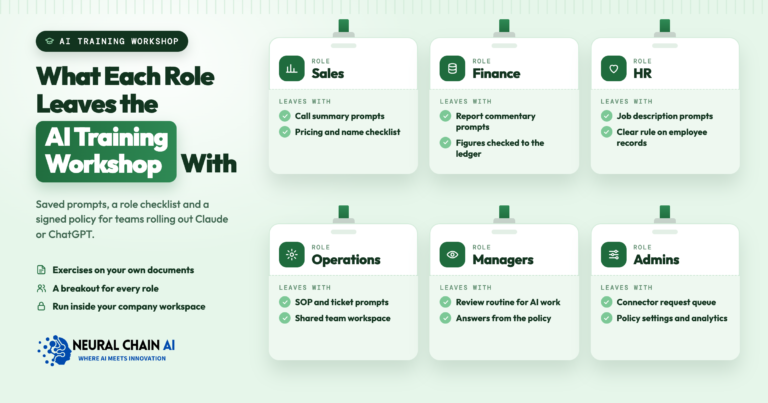
Seats pay back when staff use Claude on the work they already do, and role-based training is how that happens. Anthropic offers the free “AI Fluency for Small Business” course and in-person workshops. A session built on the company’s own files adds practice on real work. The bookkeeper works through a month-end summary with the QuickBooks connector, the sales lead preps a call from HubSpot notes, and the office manager drafts an onboarding checklist in the hiring Project.
Each session ends with what a person still checks: figures against the source system, names and dates, and anything that commits the business to a price or a promise. Our AI training for employees runs these role-based sessions on Claude, ChatGPT or Copilot, using the company’s own examples.
Usage analytics come with Team, so the owner can see how the workspace is being used after training and where a follow-up session or a better Project would help most.
How NeuralChainAI Sets Up Claude for Small Teams
We set up Claude for small teams as a defined piece of work: choosing between Pro and Team and the right seat types, company logins with domain verification and SSO where it fits, the Claude for Small Business install, scoped connectors for the apps the team uses, a plain-language AI use policy, and one role-based training session. We hand over a short admin guide so the owner can add staff and approve new connectors on their own. Anthropic bills seats directly; we do not resell them.
Our Claude consulting and Team setup service gets your team onto Claude with company logins, approved connectors, a written policy and a training session, then hands the workspace back to you. To talk through your setup first, book an AI strategy session.