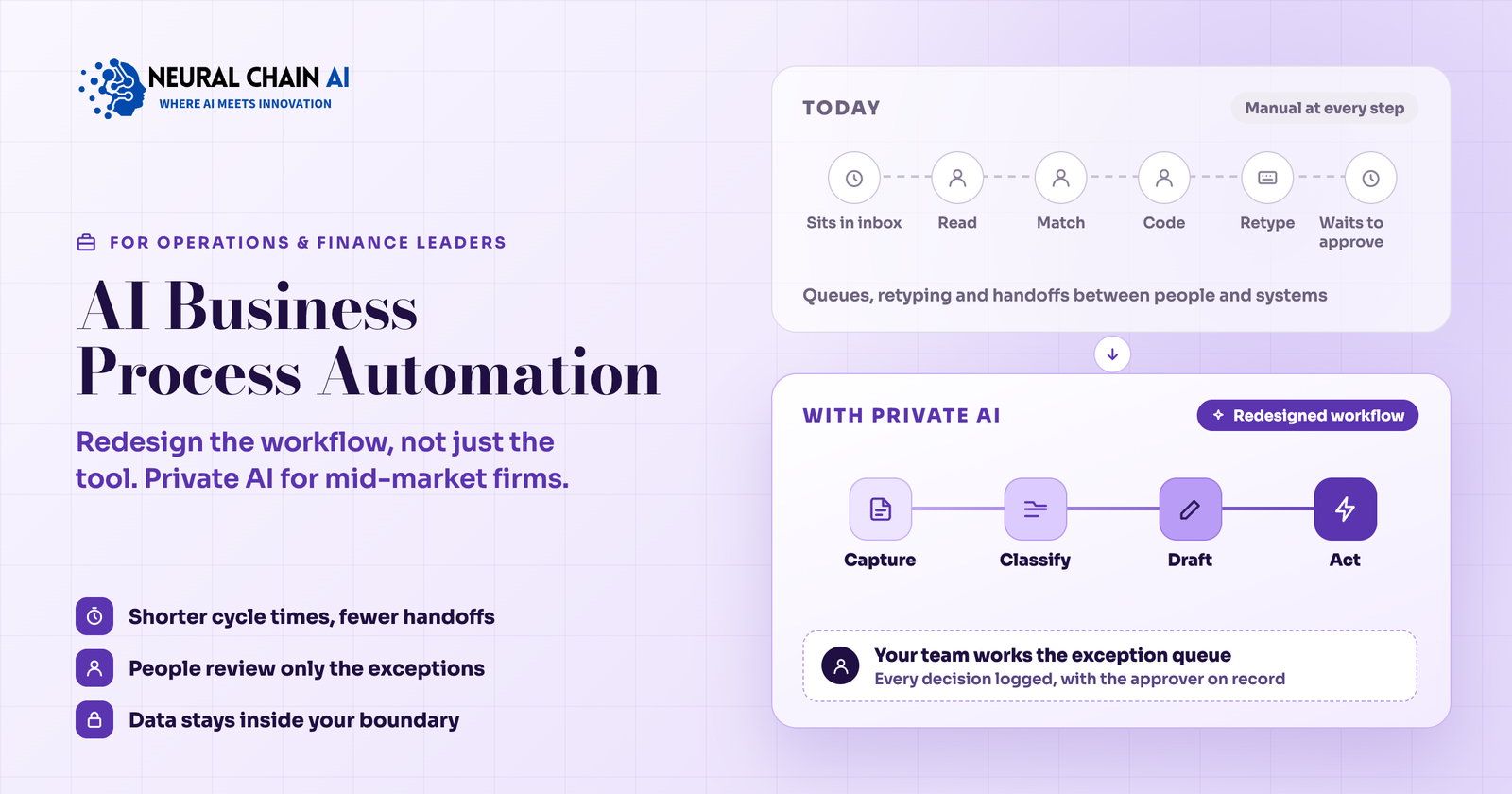
AI business process automation puts AI models inside the steps of a business process, so documents get read, requests get sorted, replies get drafted, and records get updated while people review only the exceptions. This guide shows how mid-market firms add private AI to daily workflows: the four AI layers inside a process, how to map a process before building, where the models and data run, which metrics to track, and how a rollout moves from observation to production.
Adoption is broad and results are uneven. McKinsey’s 2026 State of AI survey found that 37% of respondents attribute some EBIT impact to AI, and about 6% qualify as high performers. The 2025 edition found those high performers nearly three times as likely to have redesigned individual workflows around AI, instead of adding AI to the old steps. The 2026 survey also reports 40% of large organizations scaling AI agents, against 22% of smaller ones. Mid-market firms have less spare capacity for experiments, so a clear method for choosing and building each AI workflow pays off sooner for them.
What AI Adds to Rules-Based Business Process Automation?
Rules-based tools such as workflow engines and robotic process automation follow a fixed path. They work well when every input arrives in the same format and every decision follows a written rule. Most daily work in a mid-market firm arrives as a supplier’s emailed PDF, a customer’s three-sentence complaint, or a scanned form with handwriting in the margin. AI models read that material, extract the fields, judge which queue it belongs in, and draft the response. The rules engine keeps running the steps with fixed logic, and AI handles the steps that need reading or judgment.
4 AI Layers Inside an Automated Business Process
Every automated process combines up to four AI layers. Naming them shows which layer a given step needs and which model type fits.
| AI layer | What the AI does | Daily workflow example | What a person still checks |
|---|---|---|---|
| Capture | Reads documents, emails, scans, and forms with intelligent document processing, then extracts fields into structured data | Pulls vendor, amount, and purchase order number from an emailed invoice | Low-confidence fields and new document formats |
| Classify and route | Labels each item by type, urgency, and owner, then sends it to the right queue | Sorts shared-inbox requests into billing, claims, onboarding, and escalation | A weekly sample of routed items |
| Reason and draft | A language model with retrieval over your own documents summarizes, compares, and drafts, with citations | Drafts a customer reply using the contract and past tickets | The draft, before it leaves the building |
| Act | An agent calls tools to update records, create tasks, or trigger the next step | Posts a matched invoice to the ledger and opens a task for each exception | Approval on consequential actions |
Most workflows start with capture and classification, because those layers turn unstructured input into data the rest of the process can use. Reasoning and drafting follow, and the act layer arrives once the earlier layers have a track record on your own data. Only the act layer is agentic, which is the part where AI agents for business take actions in your systems. Teams that want the fourth layer can add it through agentic AI consulting and development when the process is ready.
How to Map a Business Process Before Adding AI?
Write the process as plain-language steps first. Tag every step as Read, Decide, Write, or Wait. A Read step has a person looking at an email, document, or screen to understand it. A Decide step applies a rule or a judgment. A Write step enters data somewhere. A Wait step is the time an item sits in a queue before anyone touches it.
AI fits Read steps most directly. It fits Decide steps where a person applies a checklist, and it shortens Wait steps indirectly, because faster reading and routing empties queues sooner. Count the handoffs between people and between systems too, since each one is a place where an item sits, gets retyped, or loses context. A process with eight handoffs across three systems gives AI more places to remove delay than one with two. The accounts payable invoice flow shows the tags at work.
| Step | Tag | Today | With AI | Human checkpoint |
|---|---|---|---|---|
| Invoice arrives by email | Wait | Sits in a shared inbox until someone opens it | A classification model spots invoices on arrival and queues them | None |
| Read the invoice | Read | A clerk reads the PDF and notes vendor, date, amount, and lines | An extraction model returns each field with a confidence score | Fields below the confidence threshold |
| Match to purchase order | Decide | A clerk searches the ERP and compares lines by eye | Matching logic proposes the purchase order and flags line differences | Mismatches above tolerance |
| Code to accounts | Decide | A clerk applies coding from memory or a cheat sheet | A model suggests coding from past invoices for the same vendor | New vendors and unusual amounts |
| Enter in the ERP | Write | A clerk retypes the data | The workflow posts the validated record | A periodic sample audit |
| Approve and pay | Wait | The approver gets an email and replies when free | The request arrives with the matched evidence on one screen | The approver’s decision |
Private AI Architecture for Daily Workflows: Where Models and Data Run?
Private AI for business means the models, the document index, and the logs run in infrastructure you control, so invoices, contracts, client files, and employee records stay inside your boundary. In practice the AI layer sits beside your existing tools and talks to them through their APIs: the mailbox, the file store, the ERP, the CRM, and the ticketing system. Documents are indexed into a vector store in your tenant, a model serves extractions and answers from the same environment, and an orchestration service moves each item through the steps and writes every decision to an audit log. Staff keep working in their usual tools and see the AI layer as pre-filled fields, suggested replies, and a short exception queue.
The following three deployment patterns cover most mid-market firms. The word private can describe different setups, so the table states what runs where.
| Deployment pattern | Where the model runs | Where your data goes | Fits when |
|---|---|---|---|
| Provider API under an enterprise contract | On the provider’s hosted infrastructure | Each request goes to the provider, under the contract’s terms on retention and training | The data is moderately sensitive and volume is modest |
| Self-hosted in your cloud account | Open-weight models served with vLLM or Ollama on GPUs in your own cloud tenant | Stays in your cloud account | The data is regulated or confidential and volume is steady |
| On-premise or air-gapped | On servers in your own facility | Stays on your network | Data residency rules are strict, or the work is highly confidential |
Many firms mix patterns by step. Extraction runs on a self-hosted model because the documents hold personal data, while drafting of non-sensitive text runs on a provider API. Our private and self-hosted AI solution deploys any of these patterns inside your environment, connected to the systems you already run.
Permissions, Audit Trails, and Governance for Private AI Workflows
A private AI layer can inherit your existing access rules. Retrieval respects document-level permissions, so an assistant answers a staff question only from files that person can already open. Service accounts get the narrowest scope each step needs. Every model call, extracted value, and action lands in a log with the input, the output, the model version, and the approver, which gives auditors a trail they can follow.
The NIST AI Risk Management Framework gives a neutral vocabulary for this work, organized around four functions: govern, map, measure, and manage. Use it as a checklist for the logging, evaluation, and ownership questions auditors raise, and name one owner per workflow who signs off on what a correct result looks like.
Designing the Exception Queue Where People Review AI Output
People stay in the process as reviewers, and the exception queue is the screen they work in. Build it as a product. Each item shows the source document, the AI’s proposed result, the confidence score, and a reason code such as “amount differs from purchase order” or “vendor not recognized”. Reviewers fix or confirm the item in one place, and the correction writes back to the process record.
Two design choices raise the quality of the whole system. Route exceptions by skill, so a tax question reaches the person who handles tax and a pricing question reaches the account manager. Feed every correction into the evaluation set, so each model or prompt change gets tested against the cases your own staff had to fix. Reason codes also show which upstream habit, such as one supplier’s invoice template, creates the most work.
Metrics for AI Business Process Automation: What to Track Per Workflow?
Process metrics show whether work flows better, beyond whether the model scores well. Capture a baseline before the build.
| Metric | What it measures | Why it matters |
|---|---|---|
| Touchless rate | Share of items completed with no human edit | Shows how much work the AI carries |
| First-pass yield | Share of items correct on the first attempt, with no downstream rework | Surfaces errors that appear later in finance, operations, or customer complaints |
| Exception rate by reason code | Share of items sent to review, grouped by cause | Points to fixes upstream of the model |
| Elapsed cycle time | Clock time from arrival to completion | Includes waiting, which often exceeds hands-on work |
| Hands-on handle time | Minutes of staff effort per item | Shows capacity returned to the team |
| Field-level accuracy | Correct extracted fields against a labeled sample | Tracks the capture layer separately from the workflow |
| Cost per completed item | Run cost plus review time, divided by items completed | Compares directly with the pre-AI baseline |
Elapsed cycle time and handle time tell different stories. An invoice may take four minutes of hands-on work and four days of elapsed time because it waits for an approver. AI that classifies the invoice, summarizes it, and pre-assembles the evidence for that approver attacks the four days, and a handle-time metric alone misses that gain.
Daily Workflows Mid-Market Firms Run on Private AI
The same patterns repeat across industries. Two examples show what AI does, what a person reviews, and what data the workflow needs.
1. Logistics and Supply Chain: Delivery Exception Handling
Carriers, drivers, and customers send delivery updates, damage notes, and proof-of-delivery photos through email and messaging. AI reads each message, matches it to the shipment record, classifies the exception type, and drafts the customer update. A dispatcher reviews anything involving a claim or a missed commitment. The workflow needs the transport management system’s API, a history of past exceptions with their outcomes, and the delivery documents. Operators in logistics and supply chain run this pattern on a private AI layer connected to their dispatch tools.
2. Financial Services: Client Onboarding Document Packs
New client packs arrive with identity documents, statements, and forms in mixed formats. AI extracts the fields, checks each document against the checklist for that product, flags what is missing or inconsistent, and drafts the request back to the client. A compliance officer reviews every flagged pack and signs off on all approvals. Because the files hold personal and financial data, many financial services firms run the models self-hosted.
How a Private AI Workflow Rollout Runs?
Rollouts follow the same stages for any process. Scope, data condition, and integration count set the schedule, and an AI strategy session sizes them for your situation.
- Map and baseline. Write the process as Read, Decide, Write, and Wait steps, and record today’s cycle time, handle time, and exception causes.
- Build the evaluation set. Collect past items with known correct outcomes, so every model and prompt change gets scored on your own data.
- Run in shadow mode. The AI processes live items beside the team while its outputs are compared with what people did, with no effect on the process.
- Assist. The AI pre-fills fields and drafts replies, and people confirm them in the exception queue.
- Operate. Items that clear the confidence threshold flow through, and people work the exceptions.
- Review on a cadence. Re-score against a refreshed evaluation set, then add the next workflow using the same stages.
Planning AI business process automation for your firm? Talk to our agentic AI consulting and development team, or book an AI strategy session to map one workflow and see what a private deployment involves.