AI tools for small business are software products that use AI to draft, summarize, sort, extract, and schedule work for owner-run firms, and the right pick depends on two things: the job you want done and the data the tool will see. This guide shows how to choose by job and data sensitivity: a job-by-job table of tool types, a four-tier data classification, the plan terms to check, a five-point scorecard, and the signs that a business has outgrown off-the-shelf tools.
Most owners already know AI can help. The U.S. Census Bureau’s Business Trends and Outlook Survey found AI use among U.S. businesses staying between 17% and 20% from December 2025 to May 2026, measured as use in any business function. Adoption keeps spreading, so the harder question has shifted from whether to use AI for small business work to which tool suits which task. Ranked lists answer with brand names. A better answer starts with the job and the data, because one product can be safe for a blog draft and a poor fit for a signed client contract.
3 Kinds of AI Tools Small Businesses Use
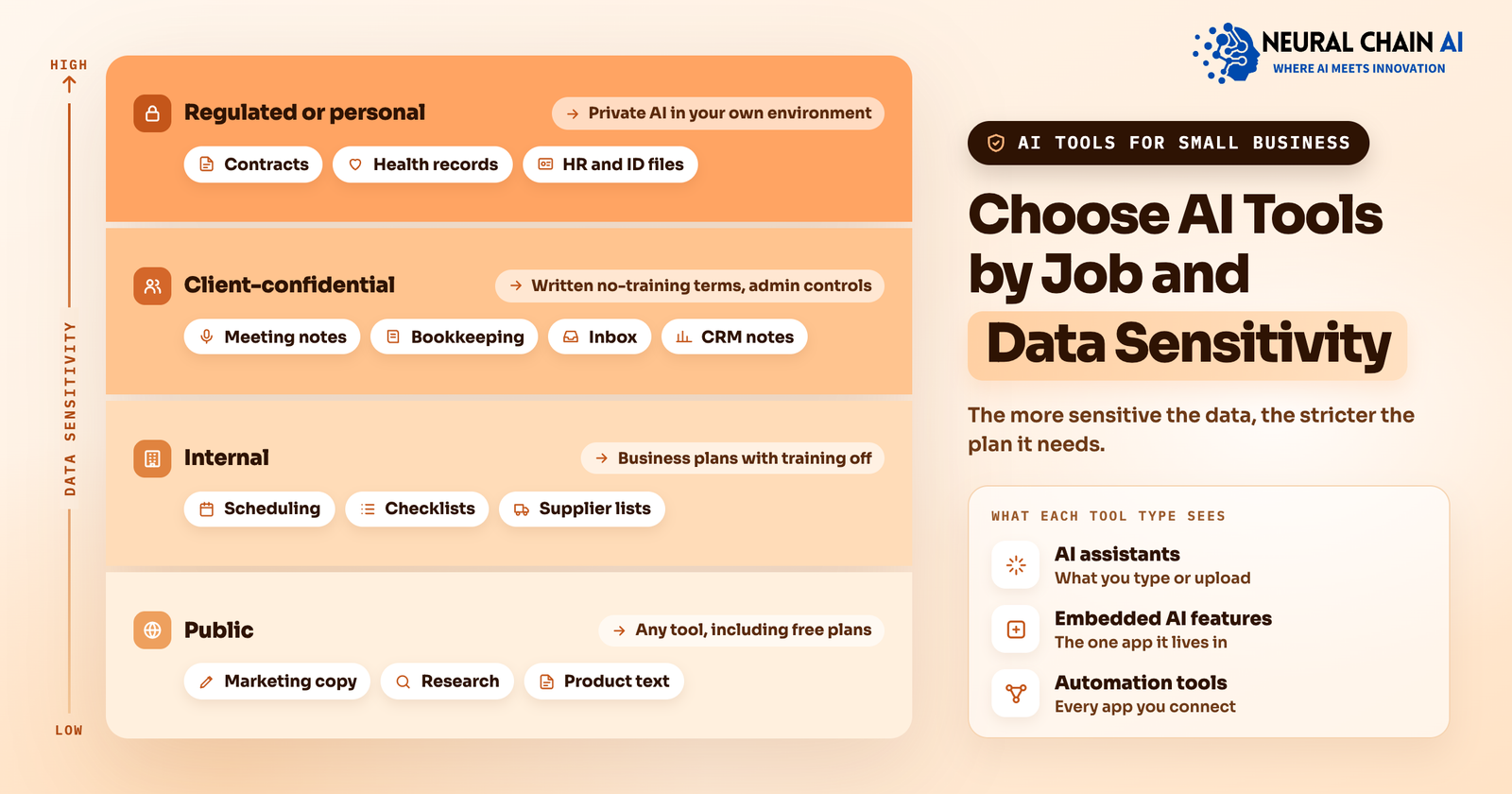
- AI assistants: They answer questions and draft text from what you type or upload, and they suit writing, research, and one-off analysis. An assistant sees what you give it.
- Embedded AI features: They sit inside software you already use, such as an accounting app that suggests categories or a CRM that summarizes a deal, and they work on the data that app already holds. An embedded feature sees one app.
- Automation tools: They connect several apps and move information between them on a schedule or a trigger, such as copying approved meeting actions into a task list. An automation tool sees every app you connect.
Best AI Tools for Small Business Owners by Job
Pick a job before you pick a product. The table lists eight common jobs, the type of tool that fits each one, the business data the tool sees, and the data tier explained in the next section.
| Job | What the AI does | Tool type to look for | Data the tool sees | Data tier |
|---|---|---|---|---|
| Marketing copy | Drafts posts, emails, and product text from your notes | A general AI assistant, or writing features in your email and design apps | Public facts and brand notes | Tier 1 |
| Research | Summarizes public information and compares options | A general AI assistant with web search | Public sources | Tier 1 |
| Scheduling | Finds meeting times, sends reminders, books appointments | An AI scheduling assistant in your calendar or booking tool | Calendars and contact details | Tier 2 |
| Meeting notes | Transcribes calls, summarizes decisions, lists action items | AI meeting notes inside your video platform, or a standalone AI note taker | Spoken client details and pricing | Tier 3 |
| Bookkeeping | Sorts transactions, reads receipts, drafts invoices | AI bookkeeping software, or AI features inside your accounting app | Financial records | Tier 3 |
| Customer messages | Sorts the inbox, drafts replies, answers common questions | Help desk or inbox AI, or a website chat assistant | Names, orders, and complaints | Tier 3 |
| Sales follow-up | Summarizes leads, drafts outreach, updates CRM notes | AI features inside your CRM | Contact and deal data | Tier 3 |
| Contracts and client files | Summarizes agreements, extracts terms, drafts clauses for review | Document AI, or a private assistant over your own files | Contracts and client records | Tier 3 or 4 |
Marketing copy and research sit in Tier 1, so almost any tool works there. Meetings, bookkeeping, inboxes, and CRM notes sit in Tier 3, because they carry client names, prices, and financial records. That gap explains why owners get good results from a free assistant on a social post and hit trouble when the same assistant reads a customer file. Choose your first job from the row where you repeat the same steps every week, such as sorting the inbox or writing meeting follow-ups. Repeated work gives you a clear before and after.
Review stays with you for every job. AI meeting notes need a skim for names and numbers, AI bookkeeping software needs a regular check of its categories, and drafted customer replies need a read before they send. Set that review habit when you adopt the tool, because AI drafts read fluently even when a detail is wrong.
4 Data Tiers for Choosing AI Tools Safely
Classify information before you paste it anywhere. The four tiers below give your staff a rule they can follow without asking you each time.
| Tier | What it covers | Examples | Where it can go |
|---|---|---|---|
| Tier 1: Public | Anything already on your website or in print | Product descriptions, draft blog posts, public pricing | Any tool, including free plans |
| Tier 2: Internal | Everyday business information with no client identity | Meeting agendas, internal checklists, supplier lists | Business-plan tools with training on your data switched off |
| Tier 3: Client-confidential | Client names, quotes, contracts, invoices, financial records | Customer emails, bookkeeping files, signed agreements | Business or enterprise plans with written no-training terms and admin controls |
| Tier 4: Regulated or personal | Health records, government IDs, payment card data, employee files, privileged legal documents | Patient notes, ID scans, HR files, case documents | Self-hosted or private AI inside your own environment |
Write the tiers on one page and share it with everyone who uses AI at work. Rules vary by country, industry, and client contract, so check the confidentiality terms your clients and regulators already set, and treat the table as a starting point. Tier 4 work belongs inside your own environment, and private and self-hosted AI is how firms run it there.
Why the Same AI Tool Carries Different Data Terms by Plan?
Data terms attach to the plan, not the brand. OpenAI’s data policy states that ChatGPT Business, ChatGPT Enterprise, ChatGPT Edu, and its API Platform do not use inputs and outputs to train its models by default, while consumer accounts carry a data-control setting that lets the user switch model improvement off. Other providers also publish their terms by plan, so read the page for the exact plan you intend to buy.
The detail matters most for staff habits. An employee who pastes a client email into a personal account puts it under consumer terms, even when the company pays for a business plan elsewhere. Give people an approved AI account for each tier and tell them which one to use. Five questions turn any privacy page into a decision.
| Question to ask | What a good answer looks like | Where to find it |
|---|---|---|
| Is my data used to train models? | No by default, stated in writing for your plan | Privacy or trust page, plan comparison |
| How long is data kept? | A stated retention period and a way to delete earlier | Data policy, admin settings |
| Who can see conversations? | Admins control access, and staff need no personal accounts | Admin guide, security page |
| Can I export and delete everything? | Yes, self-serve, without a support ticket | Account settings, help center |
| Where is data processed, and by whom? | Named regions and a published subprocessor list | Trust center, data processing terms |
A One-Page AI Use Policy for Your Team
A short written policy turns the tiers into daily habits. One page is enough when it answers six questions.
- Which tools are approved, listed by data tier.
- Which accounts to use, with personal accounts ruled out for Tier 3 and Tier 4 work.
- What never goes in, such as payment card numbers, government IDs, and health records.
- What a person reviews, such as anything sent to a client or filed with a regulator.
- Who answers questions, by name, so staff ask before guessing.
- How often the list is reviewed, since vendors change plans and terms.
Share the page when staff join and again whenever the approved list changes. Our AI enablement service helps teams choose plans, set admin controls, and train staff against a policy like this one.
Built-In AI Features vs Standalone AI Tools
Many tools you already pay for now include AI: accounting software, CRMs, email suites, help desks, and design apps. A built-in feature keeps data inside a vendor you already vetted, under a contract you already signed, with permissions you already set. Standalone tools earn their place when a job crosses several apps or the built-in feature produces weaker results.
| Factor | Built-in AI feature | Standalone AI tool |
|---|---|---|
| Data terms | Covered by your existing vendor contract | A new vendor and new terms to read |
| Setup | Switch it on in settings | Account, connections, and permissions to create |
| Staff training | Same interface your team already knows | A new interface to learn |
| Cross-app work | Limited to that app’s data | Can connect several sources |
| Quality ceiling | Varies by vendor | Often higher on a single task |
| Exit cost | Tied to the host app | Export and cancel separately |
Try the built-in feature first for any job whose data already lives in that app. Move to a standalone tool when the output needs too much editing or the job spans systems.
How to Trial an AI Tool Before You Commit?
Use a business-plan account and sample data from the tier the job requires. Collect ten past items from the job, such as ten old customer emails with names removed, and run each one through the tool. Record how many outputs you could use as written, how many needed light edits, and how many you discarded. Note the time you spent editing as well as the time the tool saved, since editing time is the hidden cost of a weak fit. Repeat the same test on a second finalist so both tools face identical inputs.
A Five-Point Scorecard for Judging Any AI Tool
After the trial, score each finalist from one to five on every point below.
- Job fit. The output needs little editing for the job you chose.
- Data tier match. The plan’s written terms cover the tier of data that job uses.
- Fit with your stack. The tool connects to the mailbox, calendar, accounting app, or CRM you already run.
- Exit and export. You can export your content and close the account without a support ticket.
- Cost shape. Pricing follows seats, usage, or both, and your volume makes the monthly bill predictable.
Treat a score below three on data tier match as a veto. No feature offsets the wrong data terms.
How Many AI Tools a Small Business Needs?
Solo owners do well with one general assistant plus the AI features inside software they already pay for. A team of five to twenty adds a shared, admin-managed account so staff stop using personal AI accounts, plus one tool for meetings or the inbox. Each extra AI tool adds a login, a bill, and a privacy review, so let your AI tool count follow the jobs that repeat, not the headlines.
When Small Businesses Outgrow Off-the-Shelf AI Tools?
Five signs show that a business has outgrown off-the-shelf tools. Staff feed the same confidential files into tools every day. AI output gets retyped between apps. The business needs answers from its own documents, with citations back to the source. Clients or regulators restrict where data may go. Usage charges climb with volume. Count how often the first sign applies before judging the rest: ask each team member to list the AI tools they used last week and what they pasted into them.
Each sign has a matching next step. Settings and staff habits call for better plans, admin controls, and training. Tier 4 data, and Tier 3 data at high volume, call for private AI inside your own environment. When several tools hand work to each other, the job has become a workflow, and AI business process automation shows how firms map those handoffs and run them with private AI.
Not sure which tier your data sits in? Describe one job and the data it touches in an AI strategy session, and NeuralChain AI team will point you to the right tool type and plan.